G98 form guide UK: how to notify your DNO for plug-in solar
I have filled in G98 paperwork myself, and the first time you look at it the form can make a very small solar system sound far more complicated than it really is. This guide goes through the process in plain English, including the newer online DNO forms now appearing and what is changing for 800VA plug-in solar.
Last updated: 27 August 2026 · Electrician-led UK guide · Now includes the official ENA plug-in registration portal
Important launch-day update: approved plug-in kits now have their own ENA registration portal
If you have bought an approved complete plug-in solar device, start at myplugin.solar. This is the official Energy Networks Association UK Plug-In Solar Registration service. It asks for the householder/address and then makes you select the exact approved device.
This does not make this G98 guide obsolete. The normal G98/G99 route still matters for conventional rooftop PV, fixed-wired microgeneration and bespoke/self-assembled systems that are not qualifying consumer plug-in products. What you cannot do is build a plug-in kit from separate parts and use a normal G98 notification as a substitute for complete-product approval.
Yes, you still notify the DNO
The new plug-in route does not remove network notification.
Some DNOs are already online
You may get a guided web form instead of the old paper-style Form B.
G98 is part of the rollout
The government has explicitly identified G98 amendments for plug-in solar.
Important: the new plug-in solar rules are now in force
The final Interim Product Specification says that DNO notification on connection and disconnection is mandatory. A compliant plug-in solar product must also give the user instructions for the relevant network notification process.
That means the physical installation is easier for a qualifying consumer product, but the DNO side has not disappeared.
One practical complication: DNO websites and forms are not all identical. Some already use guided online systems; some still provide traditional G98 documents. Follow the latest route published by your own DNO and the instructions supplied with your exact product.
First, what is G98?
G98 is the engineering recommendation used for connecting small, fully type-tested generators in parallel with the public low-voltage distribution network. Solar PV is one example.
In normal English, your house is still connected to the grid while the inverter is generating electricity. The DNO therefore needs to know that generation is connected at the property and what equipment is being used.
For ordinary single-phase G98 microgeneration, the familiar limit is 16A per phase, which is about 3.68kW at 230V. That figure causes confusion with plug-in solar, because the new plug-in product route has its own much smaller limit of 800VA.
Do not mix the two limits up. The 3.68kW figure is the familiar G98 single-phase network threshold. The 800VA figure is the maximum apparent power for the new plug-in solar product route. Being below 3.68kW does not automatically make an inverter or DIY collection of parts a compliant plug-in solar product.
Do I notify before or after connecting?
The established single-premises G98 process is normally fit/connect and notify. For standard G98 installations, DNO guidance commonly requires the installation information within 28 days of commissioning.
For example, National Grid Electricity Distribution currently describes G98 as a fit-and-notify process and tells users to notify within 28 days. Its online route gives an instant acknowledgement after submission.
For a new plug-in solar product I would still follow the specific instructions supplied with that product and the current process shown by your DNO. The new consumer framework is being introduced while the network documentation and DNO systems are also evolving.
Are G98 forms going online?
Yes — and for approved plug-in solar the change is now bigger than that. There is a dedicated national ENA consumer registration service at myplugin.solar. The DNO-specific online portals and paper forms discussed below remain relevant to traditional G98 installations and situations outside the approved plug-in consumer route.
I noticed this myself when I went to notify a kit and, instead of the old form I had used before, I was taken through an online process. Looking across the network operators, this is not just a one-off.
National Grid Electricity Distribution now provides an online G98 notification form. It says the form takes around 10–15 minutes, gives instant acknowledgement and can identify the MPAN, although the older downloadable Form B remains available if somebody cannot or does not want to apply online.
UK Power Networks uses its Smart Connect installer portal for generation connections. UKPN says Smart Connect can handle the existing ENA forms electronically: the user selects the devices, adds the installation details and supporting evidence, and the portal works out which declaration/process is required.
SP Energy Networks has also been involved in the iDentify approach, designed to replace paper forms for technologies including microgeneration and route information digitally to the correct DNO. At the same time, SPEN still publishes the formal G98 forms on its website, which shows the transition is not complete everywhere.
For approved plug-in solar, there is now a single national consumer-facing registration site. For traditional G98 installations, different DNOs still use different portals/forms, so the rest of this guide remains useful.
| Example network operator | What is available now | What this means for you |
|---|---|---|
| National Grid Electricity Distribution | Guided online generation/G98 notification with instant acknowledgement; downloadable G98 forms are also retained. | If this is your DNO, start with its current online generation notification page rather than assuming you need to email a PDF. |
| UK Power Networks | Smart Connect handles generation applications/notifications and existing ENA forms electronically. | The portal can guide the route from the equipment and installation details entered. |
| SP Energy Networks | Digitalisation work exists, while formal G98 Form A/B/C/D documents are still published. | Check the current SPEN route when you notify rather than relying on an old saved copy of Form B. |
DNO processes change. I have deliberately not turned this into a list of every old PDF/email address because those are exactly the details most likely to become stale. Use the current DNO notification page when you are ready to submit.
Is G98 actually changing for 800VA plug-in solar?
Yes. There is official evidence that G98 changes form part of the plug-in solar rollout.
When the government announced the policy in March 2026 it said it would work with the Energy Networks Association, DNOs and Ofgem to update the G98 distribution code so that sub-800W plug-in solar could connect to domestic mains sockets under the new route.
The June consultation then explicitly listed amendment of Engineering Recommendation G98 as one of the measures needed to allow a plug-in microgenerator complying with the Interim Product Specification to connect to low-voltage distribution networks.
The final Interim Product Specification is even more useful because it tells us where one of the remaining mismatches sits. The product specification permits one plug-in solar product per household final circuit, but notes that the current network requirement in G98 Issue 2 Amendment 1 (2026) restricts this to one device per household unless and until G98 is amended.
What I would do right now
I would treat one plug-in solar device per household as the network limit until the relevant G98 amendment and DNO guidance say otherwise. I would not buy several 800VA products for separate circuits on the assumption that the IPS wording alone makes that acceptable.
There is also evidence that simplification is part of the intended rollout. The government's electrical safety study recommends a simplified registration approach to support safe and proportionate deployment.
What I have not seen published yet is one final, universal, householder-only “800VA plug-in solar G98 form” used by every DNO. So I would not tell readers that such a national form exists until it actually does.
What information will I normally need?
Whether your DNO gives you a PDF, an online form or a guided portal, the underlying information is broadly the same. I would get this together before starting:
| Information | What it means | Where I would get it |
|---|---|---|
| Name and installation address | The person/site where the generation is connected. | Your own details. |
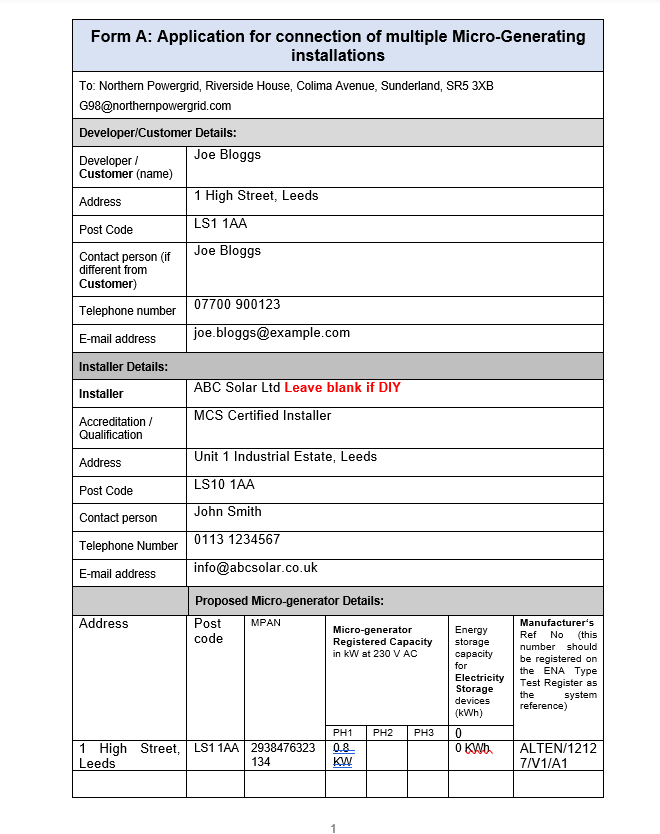
| MPAN | The identifier for the electricity supply point. | Your electricity bill or online energy account. Some online DNO systems can identify it from the address. |
| DNO | The company operating the local distribution network — not necessarily your electricity supplier. | Use a postcode/network-operator lookup or your MPAN distributor information. |
| Manufacturer and exact model/product | The generating equipment being connected. | Product label and manufacturer documentation. |
| Registered AC capacity | The network-registered AC output of the generating unit/product. | Manufacturer G98/network documentation or the relevant ENA device entry. |
| ENA/type-test/device reference | The reference identifying the type-tested generating equipment. | The exact product documentation or relevant ENA register/device entry. |
| Connection/commissioning date | The date the generator was connected and put into service. | Your installation record. |
| Existing generation | Any rooftop PV, battery inverter or other generator already connected. | Your existing DNO paperwork and equipment details. |
| Installer/customer details | Traditional portals may still ask for both because they were designed around installer-led generation. | For a lawful self-installed plug-in product, follow the product/DNO instructions rather than inventing an installer. |
MPAN: the number people often get wrong
Your MPAN identifies the electricity supply point. It is normally on the electricity bill or in your online account. It is not the meter serial number printed on the front of the meter, and it is not your supplier account number.
Registered capacity: do not enter the panel wattage by mistake
This is probably the easiest technical field to get wrong. A plug-in kit can have more than 800W of solar modules on the DC side while its inverter output is limited to 800VA on the AC side.
If the form asks for registered capacity or generating capacity, use the AC figure specified in the product/network documentation. Do not simply add the wattages printed on the solar panels unless the form separately asks for DC/PV capacity.
ENA or device reference
Use the reference for the exact generating equipment. Do not pick an inverter with a similar name or copy the number from my example form. Online portals can make this easier because some let you search/select the approved device rather than manually typing all of its technical data.
This is one reason I like the move online. A guided portal that knows the approved device can reduce typing mistakes, route the submission correctly and stop a householder having to reverse-engineer engineering paperwork from a product listing.
Step-by-step: how I would notify a plug-in solar kit
Decide which route you are actually on
If it is an approved complete plug-in solar device, use myplugin.solar rather than working through the traditional steps below. If it is a conventional/fixed-wired or bespoke microgeneration installation, continue with the normal G98/G99 process. A G98-certified microinverter bought separately does not turn a home-assembled plug-in product into an approved consumer kit.
Find your DNO
Your electricity supplier bills you; the DNO owns and operates the local network. Find the DNO for the installation address before you start. Do not send G98 information to your electricity retailer just because its name is on your bill.
Go to the DNO's current generation notification page
Do this rather than searching Google for an old Form B PDF and assuming it is still the preferred method. If your DNO offers a guided online G98 journey, I would use that. If it still directs you to a current form, use the current form.
Have the MPAN and address ready
Use the supply MPAN, not the meter serial number. Some online systems may retrieve the MPAN from the address, but I would still have it available.
Select or enter the exact generating equipment
Use the manufacturer, model and device/type-test reference supplied with the product. If the portal has a device lookup, make sure the exact model and rating match.
Enter the correct AC capacity
For an 800VA plug-in product, do not accidentally enter the combined DC panel wattage in a field asking for AC registered capacity. Read the field wording carefully and use the manufacturer's network documentation.
Declare existing generation accurately
If the property already has solar, battery storage or another generator, include it where requested. The DNO needs the real picture at the premises, not just the new device.
Deal with installer fields honestly
Some existing systems still assume a professional installer because that is how traditional G98 forms were designed. If a compliant plug-in product has genuinely been self-installed under the new route, do not make up an electrician. Follow the manufacturer's instructions and the DNO's consumer route; if a mandatory field makes no sense, ask the DNO what it wants entered.
Submit and keep the acknowledgement
Save the confirmation email, reference number or submitted form together with the product's compliance and network documentation. An online acknowledgement is particularly useful because you have a clear record that the notification was made.
Remember disconnection
The final plug-in solar specification says the DNO must also be notified when the product is disconnected. If you permanently remove it, update the network record rather than leaving generation registered at the property forever.
Can I submit G98 myself?
For the new plug-in solar route, the process has to be usable by the householder. Government policy is specifically enabling compliant products to be installed without automatically requiring an electrician, and the final product specification requires the manufacturer to provide the user with DNO notification instructions.
That does not mean every legacy DNO form has already been rewritten in consumer language. During the transition, you may still see terms such as installer, commissioning engineer or installation document. Use the product instructions and DNO guidance rather than inventing information.
What if I already have solar or a battery?
This is where I would slow down rather than treating the new 800VA device in isolation.
If you already have rooftop PV, a battery inverter or another generator, the DNO needs an accurate picture of the aggregate generation at the premises. Existing equipment can affect which connection route applies and what information is required.
The new Interim Product Specification also does not cover plug-in batteries or plug-in solar products incorporating electrical energy storage. If a product includes storage, do not assume this solar-only notification guide is the whole story. See my plug-in battery storage guide.
Can I have more than one 800VA plug-in solar device?
This is an important current limitation. The final product specification permits one product per suitable final circuit, but the same specification notes that current G98 network requirements restrict this to one device per household until G98 is amended.
So at the moment I would not tell somebody that two separate ring finals automatically mean two 800VA products can be connected. The electrical product rule and the network rule both have to be satisfied.
Common G98 mistakes I would avoid
- Using an old form without checking the DNO website first. An online notification route may now be available.
- Entering total panel wattage instead of registered AC capacity.
- Using the meter serial number instead of the MPAN.
- Sending the notification to your electricity supplier instead of the DNO.
- Copying an ENA/device reference from somebody else's inverter or from my example image.
- Assuming G98 approval of an inverter proves the whole plug-in solar product complies with the new IPS.
- Inventing installer details when a product has genuinely been self-installed under the lawful consumer route.
- Ignoring existing solar, battery storage or other generation at the property.
- Assuming one 800VA product per circuit already overrides the current one-device-per-household G98 restriction.
- Throwing away the acknowledgement. Keep the DNO reference with the system paperwork.
- Forgetting to notify permanent disconnection.
Why the online move makes sense for plug-in solar
Traditional G98 paperwork was designed around installers who deal with generation connections regularly. Plug-in solar is different: the policy is intended to put small compliant products into the hands of ordinary householders.
If thousands of consumers start connecting sub-800VA systems, a guided online process is far more realistic than expecting every buyer to understand an engineering form, locate an MPAN, interpret type-test references and email documents to the right network team.
The government's safety work recommending a simplified registration approach fits that direction. It does not prove every DNO will use the same portal, but it does support the view that the notification process needs to become simpler as plug-in solar rolls out.
My view
I would keep G98 notification. The DNO genuinely needs to know where generation is connected. What I would change — and what appears to be happening — is the way the consumer provides the information.
For an 800VA compliant product, the ideal process is simple: enter the address, identify the supply, select the approved product, confirm the connection date and existing generation, submit, and receive an acknowledgement. The technical product data should already be known from the approved device record rather than typed from scratch by the homeowner.
Common questions
Is G98 the same as the 800VA limit?
No. G98 is the network connection framework for small generation. The 800VA figure is the output limit for the new plug-in solar product route.
Is registered capacity the same as solar panel wattage?
No. Registered capacity normally refers to the AC generating capacity specified for the inverter/generating unit. A form may separately ask for PV/DC capacity.
Do I notify my electricity supplier?
Normally the generation notification goes to the DNO, which may be a completely different company from your electricity supplier.
Do I still need the old G98 Form B?
Possibly, depending on the DNO and its current process. Some DNOs now provide guided online notification while retaining formal forms as an alternative. Start with your DNO's current generation/G98 page.
Does an online form mean the rules have changed?
Not necessarily. The online portal can simply be a better way of collecting the same network information. Separately, G98 amendments are also part of the 2026 plug-in solar rollout.
Can the manufacturer notify for me?
A manufacturer may make the process easier, but the final product specification requires it to provide notification instructions; it does not say every manufacturer must submit the DNO notification on the customer's behalf.
Can I notify several plug-in units?
Do not assume so yet. The final IPS permits one per final circuit, but explicitly notes the current G98 restriction of one plug-in solar device per household unless and until G98 is amended.
Official sources I used for this update
- GOV.UK — Plug-in solar regulatory amendment, government response and final Interim Product Specification
- GOV.UK — consultation policy intent, including amendment of G98
- GOV.UK — March 2026 announcement confirming work with ENA, DNOs and Ofgem to update G98
- GOV.UK — electrical safety study recommending a simplified registration approach
- National Grid Electricity Distribution — current G98 online notification guidance
- UK Power Networks — Smart Connect digital generation process
- SP Energy Networks — current G98 forms and guides
Related PluginSolarHub guides
Does plug-in solar need registering?
The wider DNO/G98 position and why notification still applies.
Registration guide →Confirmed 27 August rules
The complete legal framework, product limits and what changes.
Read the rules →UK Product Register
Check the evidence we have found for products being marketed for the UK plug-in route.
Check the register →Bottom line
Plug-in solar still needs DNO notification, but the new consumer route is now live.
The old G98 Form B is no longer the only experience a householder may see. Some DNOs already have online journeys, and official government documents confirm that G98 amendments and a simpler registration approach form part of the wider plug-in solar rollout.
Until the next G98 changes are actually published and adopted, I would use the latest process from your own DNO, use the exact details supplied with the compliant product, keep the acknowledgement, and stay within the current network restrictions.
This guide explains the process in plain English and is updated as the UK plug-in solar framework develops. DNO portals and engineering requirements can change, so always check your network operator's current submission route before notifying.